
- EFTPOS & Point of Sale Solutions
Processing MOTO Payments with Zeller
By Team ZellerDiscover how Zeller MOTO payments work for your business.
MOTO transactions are a quick, convenient, and secure way to accept payment from customers remotely. Also known as ‘manually entered card payments’, these types of transactions are another way for merchants to grow their business.
Unlike traditional card payments – where both the customer and their card are physically present – MOTO payments can occur anywhere. Businesses that accept MOTO payments aren’t reliant upon having a brick-and-mortar location for customers to visit, or even a website or online store.
With Zeller, you can process MOTO payments in two ways – through Zeller Virtual Terminal on any computer, or via your Zeller Terminal.
What is a MOTO payment?
MOTO is short for Mail Order, Telephone Order. It refers to the act of processing a payment remotely – over the phone via a verbal request, or in writing via mail. Both of these scenarios are what’s known as card-not-present transactions, or CNP payments.
Instead of a customer tapping, dipping, or swiping their card or another payment device to Zeller Terminal, the merchant will enter the card details and process the transaction manually. Typically, when a merchant processes a MOTO transaction, neither the card nor the cardholder is physically present – making it difficult to verify the purchaser’s identity.
This lack of visibility increases the risk for fraudulent transactions to occur. For this reason, additional security practices are required to process MOTO payments.
Which businesses benefit most from MOTO payments?
MOTO payments are particularly useful for:
Professional services such as consultants, accountants, and lawyers
Home services such as electricians, plumbers, and cleaners
Restaurants and cafés taking phone orders for takeaway or catering
B2B businesses that take orders over the phone
If you take orders remotely, whether frequently or sporadically, MOTO gives you the flexibility to keep your cashflow moving.
How to accept MOTO payment with Zeller.
To process a MOTO payment with Zeller Virtual Terminal:
Log in to Zeller Dashboard and select Virtual Terminal.
Choose the site you want to take the payment for (or create a new one).
Enter the transaction amount and any notes you’d like to keep.
Select Manually Enter Card as the payment method.
Enter the customer’s card number, expiry date, and CVC.
Review the details, then click Charge.
The payment will be processed instantly, and you’ll see confirmation once it’s approved. Funds settle to your nominated account as usual.

To process a MOTO payment with Zeller Terminal:
On your device, tap the Mode button and then tap MOTO. You’ll notice that the payments screen turns blue to indicate that you’re now processing a MOTO payment.
Enter the transaction amount.
Tap Manual Charge.
Verify the cardholder’s identity.
Enter the card number, expiry date, and CVC then tap Next.
Check the amount and card details are both correct.
Tap Charge.
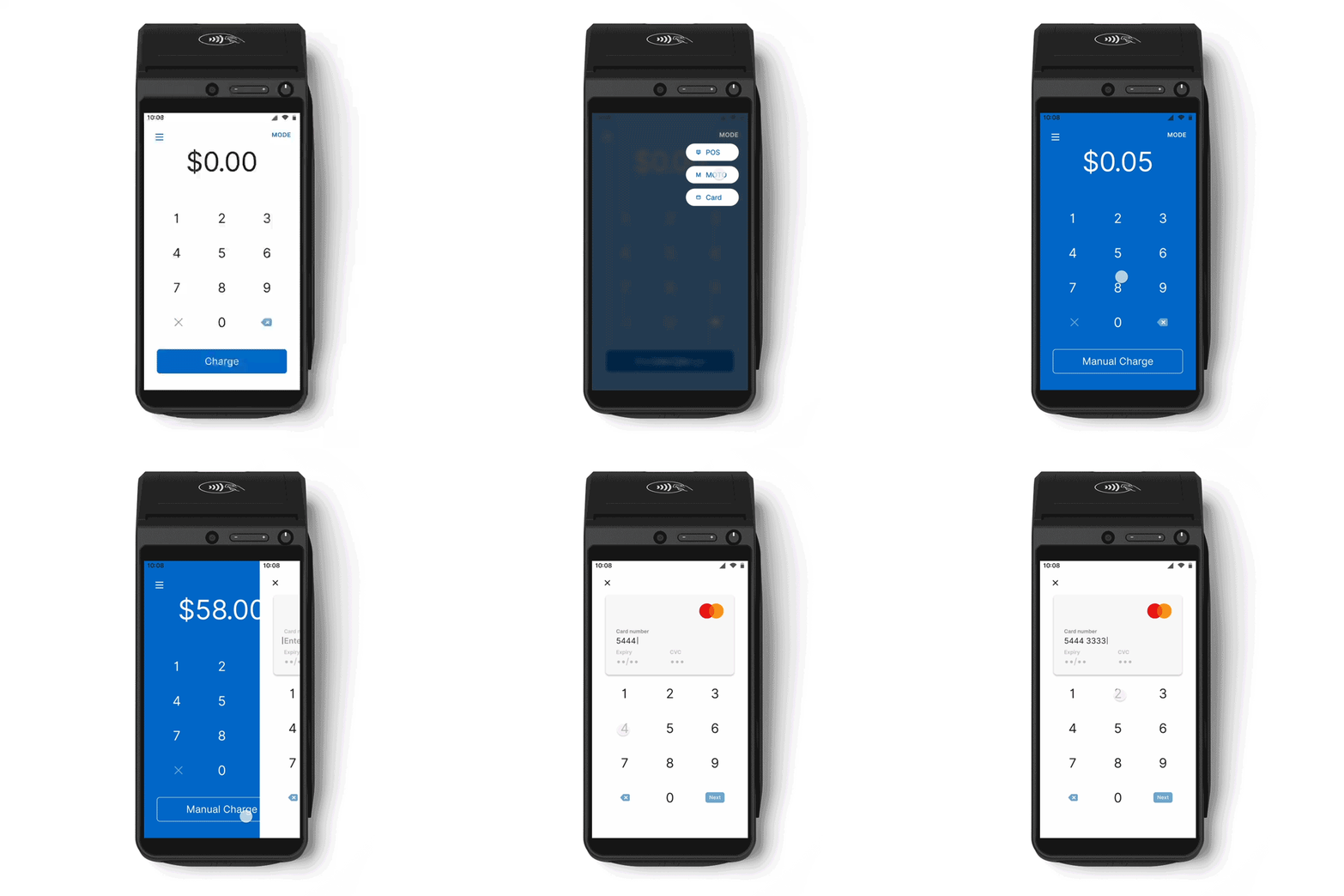
You also have the option to default to MOTO payment. This is especially handy for merchants operating without a brick-and-mortar shopfront, or those processing a higher volume of MOTO payments. Simply update your Sites settings in Zeller Dashboard by toggling Default to MOTO on.
To reflect the increased risk of fraud with MOTO payments, you can require that a site PIN be entered before a MOTO payment can be processed by toggling Require site PIN on.
Are MOTO payments safe?
MOTO transactions carry more risk than face-to-face or online payments, because the cardholder isn’t physically present. However, with the right tools and processes, they can be processed securely.
How Zeller protects your MOTO transactions
Zeller provides multiple layers of protection to reduce the risk of fraud and chargebacks:
Mandatory CVV input – requires the three-digit code on the back of the card
Address Verification Service (AVS) – checks that the billing address matches the cardholder’s bank records
3D Secure authentication – adds an extra layer of verification for suspicious transactions
Tokenisation – replaces card details with encrypted tokens to protect sensitive information
These safeguards help keep both your business and your customers secure.
Best practices for secure MOTO payments
To protect your business when processing MOTO transactions:
– Confirm the customer’s details and order verbally
– Never write down or store card details manually
– Only use PCI-compliant systems like Zeller Virtual Terminal
– Be cautious of unusually large, urgent, or overseas orders
– Watch out for red flags such as repeated declined payments, requests for third-party payments, or unusual quantities of products
– Make sure billing and shipping addresses match where relevant
– For higher-value or unusual transactions, consider extra safeguards such as a signed service agreement, clear refund policy, or asking for a copy of the customer’s government-issued identity documents (e.g. passport and/or driver's licence)
– Always provide an emailed receipt as proof of purchase
Visit our Support Centre for more information on the risks of accepting MOTO payments, and tips to help keep your business safe when processing manually entered card payments.
How much do MOTO transactions cost?
To cover the cost of measures put in place to protect against fraudulent transactions, Zeller's fee to process a manually entered card transaction is 1.7% – slightly higher than the flat fee of 1.4% applied to in-person card payments.
A more secure alternative: Zeller Payment Links
Instead of taking card details over the phone, you can send a secure payment link via SMS, email or any other platform (e.g. WhatsApp, Messenger, Telegram, etc).
Your customer clicks the link, enters their own details, and completes the payment in a PCI-compliant environment. This reduces your exposure to fraud, builds trust with customers, and gives your business a more professional edge.


